


Repeating
Repeating is operated in the same way a CD is played. Refer to “Repeating” F5-28.
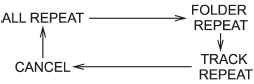
Each time you briefly press the “RPT/ RDM” button, the mode changes in the following sequence.
See also:
Unfastening the seatbelt
Unfastening the seatbelt
Push the button on the buckle.
Before closing the door, make sure that
the belts are retracted properly to avoid
catching the belt webbing in the door. ...
Maintenance tips
Some clips and fender linings must be removed before replacing the air cleaner
elements or specific bulbs. ...
Random playback
Type A and B audio
Type C audio
To playback a track/file(s) at random, press the “RPT/RDM” button for 0.5 second or longer while the track/file is playing.
Each time you press the button, the mode ...