


Other sound setting controls
Type A and B audio
Type C audio
Each brief press of the “MENU” button changes the control modes in the following sequence.
Type A audio:
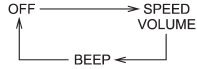
Type B audio:
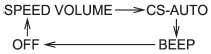
Type C audio:
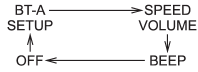
Choose the desired settings for each mode by turning the sound control dial.
The control function returns to the tune/ track/channel control mode after approximately 5 seconds.
See also:
Ashtray (if equipped)
- Do not use ashtrays as waste
receptacles or leave a lighted
cigarette in an ashtray. This
could cause a fire.
- Always extinguish matches and
cigarettes before putting them
into the a ...
Under-floor storage compartment
The subfloor storage compartment is located under the floor of the trunk or cargo
area and can be used to store small items. To open the lid, pull the tab or handle
up.
NOTE
When storing a flat ...
Other markings
The following makings are also placed on the sidewall. ...