


Garage door opener programming in the U.S.A.
NOTE
When programming the HomeLink® Wireless Control System for a garage door opener, it is suggested that you park the vehicle outside the garage.
1. Unplug the motor of the garage door opener from the outlet.
NOTE
If any of the HomeLink® buttons are already programmed for other devices, skip step 2 because it clears the memory of all three buttons.
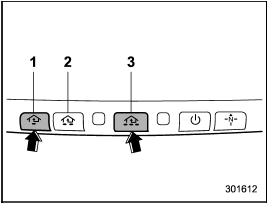
1) HomeLink® button 1
2) HomeLink® button 2
3) HomeLink® button 3
2. Press and hold the two outer HomeLink® buttons (button 1 and button 3) until the indicator light begins to flash (after approximately 20 seconds). Then release both buttons.
3. Hold the end of the garage door opener’s hand-held transmitter between 1 and 3 inches (25 and 76 mm) away from the HomeLink® button you wish to program.
4. Simultaneously press and hold both the hand-held transmitter button and the desired HomeLink® button. DO NOT release the buttons until step 5 has been completed.
NOTE
Some gate operators and garage door openers may require you to replace this programming step 4 with procedures in “Programming for entrance gates and garage door openers in Canada”.
5. Hold down both buttons until the HomeLink® indicator light flashes, first slowly then rapidly. When the indicator light flashes rapidly, both buttons may be released. (The rapidly flashing light indicates successful programming of the new frequency signal.) 6. Press and hold the programmed button and check the HomeLink® indicator light. If the indicator light stays on continuously, your garage door should activate and the programming is completed.
If the indicator light flashes rapidly for 2 seconds and then stays on continuously, your garage door opener may be protected by a rolling code feature. In this case you need to perform the additional steps that are described in “Programming rolling-code-protected garage door openers in the U.S.A.”.
See also:
Vehicle identification
1) Vehicle identification number
2) Emission control label
3) Tire inflation pressure label
4) Certification label
5) Vehicle identification number plate
6) Model number label
7) Fuel label
8 ...
Parking on a grade
Always block the wheels under both
vehicle and trailer when parking. Apply
the parking brake firmly. You should not
park on a hill or slope. But if parking on a
hill or slope cannot be avoided ...
To decrease the speed (by brake pedal)
1. Depress the brake pedal to release cruise control temporarily.
2. When the speed decreases to the desired speed, press the “RES/SET” switch
to the “SET” side once. Now the desired speed is set a ...