


Illumination brightness control
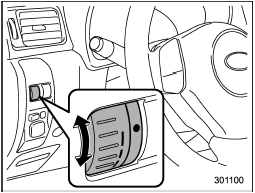
The brightness of clock display, audio, air conditioner, information display and instrument panel illumination dims when the light switch is in the “ ” or “
 ” positions. You can adjust brightness of the instrument panel illumination for better visibility.
For turbo models, you can also adjust the brightness of the instrument panel illumination when the lighting switch is in the “OFF” position.
To brighten, turn the control dial upward.
To darken, turn the control dial downward.
NOTE
When the control dial is turned fully upward, the illumination brightness becomes the maximum and the automatic dimming function does not work at all.
See also:
LOCK
The key can only be inserted or removed in this position. The ignition switch
will lock the steering wheel when you remove the key.
If turning the key is difficult, turn the steering wheel slightly ...
Service mode
In service mode, the remote start function
is temporarily disabled to prevent the
system from unexpectedly starting the
engine while being serviced. ...
Windshield washer fluid
If you spray washer fluid on the windshield but the supply of washer fluid appears to diminish, check the level of washer fluid in the tank.
Washer fluid level gauge
Remove the washer tank fill ...