


Ignition switch

• Never turn the ignition switch to “LOCK” while the vehicle is being driven or towed because that will lock the steering wheel, preventing steering control. And when the engine is turned off, it takes a much greater effort than usual to steer.
• Before leaving the vehicle, always remove the key from the ignition switch for safety and never allow an unattended child to remain in the vehicle. Failure to follow this procedure could result in injury to a child or others. Children could operate the power windows, the moonroof or other controls or even make the vehicle move.

Do not attach a large key holder or key case to either key. If it banged against your knees or hands while you are driving, it could turn the ignition switch from the “ON” position to the “Acc” or “LOCK” position, thereby stopping the engine.
Also, if the key is attached to a keyholder or to a large bunch of other keys, centrifugal force may act on it as the vehicle moves, resulting in unwanted turning of the ignition switch.
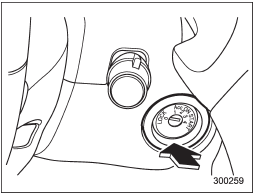
The ignition switch has four positions:
LOCK, Acc, ON and START.
NOTE
• Keep the ignition switch in the “LOCK” position when the engine is not running.
• Using electrical accessories for a long time with the ignition switch in the “ON” or “Acc” position can cause the battery to go dead.
• If the ignition switch will not move from the “LOCK” position to the “Acc” position, turn the steering wheel slightly to the left and right as you turn the ignition switch.
See also:
Deleting device
1. Select the “DELETE AUDIO” menu by operating the “TUNE/TRACK/CH” dial. If no devices are registered, “EMPTY” is displayed and the mode changes to the Bluetooth® audio setting mode.
2. Select the “C ...
Subaru Legacy 2.5GT: 265 Turbocharged Horses
The new-generation Legacy 2.5GT models get a significant boost in performance
from the revised 2.5-liter turbocharged / intercooled engine (based on the
Impreza WRX engine) teamed to a new standar ...
Upshift/downshift indicator (AT and CVT models)
When the manual mode is selected, the gear position indicator (which shows the
current gear selection) and the upshift/ downshift indicator light up. Refer to
“Automatic transmission/Continuously ...