


Tilting moonroof
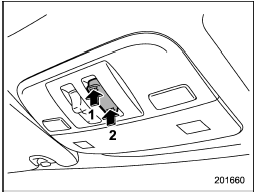
Tilting moonroof
1) Raise
2) Lower
The tilting function will only operate when the moonroof is fully closed.
Push the rear side of the “UP/DOWN” switch to raise the moonroof.
Push the front side of the “UP/DOWN” switch to lower the moonroof.
Release the switch after the moonroof has been raised or has been lowered completely.
Pushing the switch continuously may cause damage to the moonroof.
NOTE
One-touch operation does not take place when the moonroof is lowered.
Push the switch continuously to raise and lower the moonroof.
See also:
Fuses
CAUTION
Never replace a fuse with one having a higher rating or with material other than
a fuse because serious damage or a fire could result.
The fuses are designed to melt during an overload to ...
Automatic/Emergency Locking Retractor (A/ELR)
Each passenger’s seatbelt has an Automatic/ Emergency Locking Retractor (A/ ELR). The Automatic/Emergency Locking Retractor normally functions as an Emergency Locking Retractor (ELR). The A/ ELR has a ...
Meters and gauges
NOTE
Liquid-crystal displays are used in
some of the meters and gauges on
the combination meter. You will find
their indications hard to see if you wear
polarized glasses. ...