


Driver’s side switches
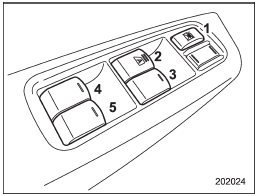
Driver’s side switches
1) Lock switch
2) For driver’s window (with one-touch auto up and down feature (type
A)/one-touch auto down feature (type B))
3) For front passenger’s window
4) For rear left window
5) For rear right window
All door windows can be controlled by the power window switch cluster at the driver side door.
See also:
Checking the clutch pedal free play
1) 0.19 – 0.44 in (5 – 11 mm)
Lightly press the clutch pedal down with your finger until you feel resistance,
and check the free play.
If the free play is not within proper specification, contac ...
Map light
1. Remove the lens by prying the edge of the lens with a flat-head screwdriver.
2. Turn the bulb until the flat surfaces at its ends are aligned vertically.
Pull the bulb straight downward to r ...
Steps for Determining Correct Load Limit
1. Locate the statement “The combined weight of occupants and cargo should never
exceed XXX pounds” on your vehicle’s placard.
2. Determine the combined weight of the driver and passengers that wil ...