


To hook the top tether
To hook the top tether
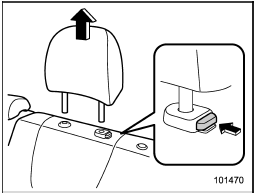
1. Remove the head restraint at the window-side seating position where the child restraint system has been installed with the lower anchorages or seatbelt; lift up the head restraint while pressing the release button. Store the head restraint in the trunk (4-door) or cargo area (5-door).
Avoid placing the head restraint in the passenger compartment to prevent it from being thrown around in the passenger compartment in a sudden stop or a sharp turn.
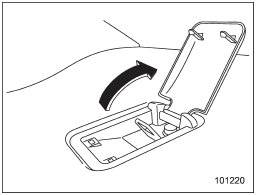
4-door models
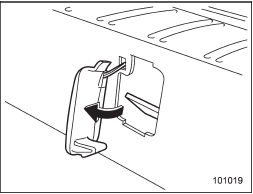
5-door models (type A)
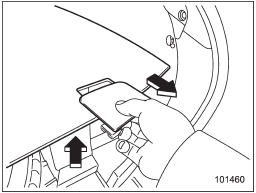
5-door models (type B)
2. Open or remove the cover for the appropriate upper anchorage.
NOTE
For 5-door models with the type B top tether anchorages, there is a top tether cover on the cargo floor cover. Lift up the cargo floor cover and remove the top tether cover. After removing the cover, store it in the under-floor storage compartment or another storage compartment. Refer to “Under-floor storage compartment” or “Storage compartment”.
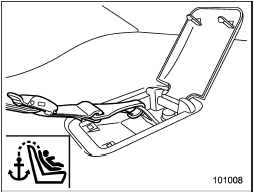
4-door models
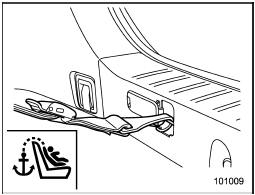
5-door models (type A)
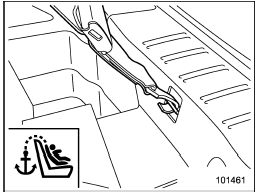
5-door models (type B)
3. Attach the child restraint top tether hook to the appropriate upper anchorage.
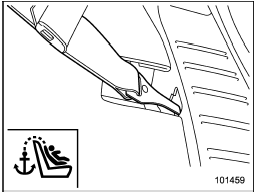
4. For 5-door models with the type B top tether anchorages, reinstall the cargo floor cover.
5. Tighten the top tether securely.
Please contact your SUBARU dealer if you have any question regarding the installation of a child restraint system.

Always remove the head restraint when mounting a child restraint system with a top tether. Otherwise, the top tether cannot be fastened tightly.
See also:
When the following messages are displayed
If one of the following messages is
displayed while connecting the USB storage
device/iPod®, determine the cause
based on the following information. If you
cannot clear those messages, please ...
Tires
*: This torque is equivalent to applying approximately 88 to 110 lbf (40 to
50 kgf) at the edge of the wheel nut wrench. If you have tightened the wheel nuts by yourself, have the tightening torqu ...
Starting your vehicle
NOTE
All vehicle doors, the engine hood and trunk / rear gate must be closed prior
to activating the remote engine start system. Any open entry point will prevent
starting or cause the system t ...