


Type A seat heater
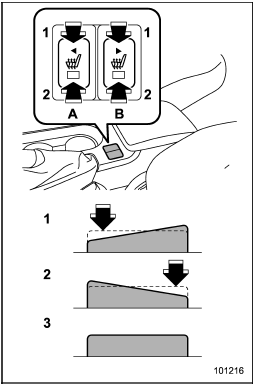
Type A seat heater
1) HI – Rapid heating
2) LO – Normal heating
3) OFF – Off
A) Left-hand side
B) Right-hand side
To turn on the seat heater, push the “LO” or “HI” position on the switch, as desired, depending on the temperature.
Selecting the “HI” position will cause the seat to heat up quicker.
To turn off the seat heater, lightly press the opposite side of the current position.
The indicator located on the switch illuminates when the seat heater is in operation.
When the vehicle’s interior is warmed enough or before you leave the vehicle, be sure to turn the switch off.
See also:
Washing the underbody
Chemicals, salts and gravel used for deicing road surfaces are extremely corrosive,
accelerating the corrosion of underbody components, such as the exhaust system,
fuel and brake lines, brake cabl ...
When there are CDs loaded (type B)
Press a desired one of the disc select
buttons (from
to
) the disc
number indicator of which steadily lights
up. The player will then start playback of
the selected CD, beginning with the f ...
Vehicle Dynamics Control mode switch (STI)
Indicator light
Vehicle Dynamics Control mode switch
When the switch is pressed briefly or for more than approximately 3 seconds during engine operation, the mode of the Vehicle Dynamics Control Sys ...