


To decrease the speed (by button)
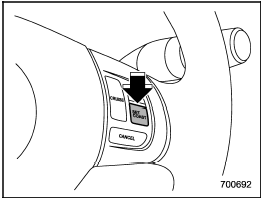
To decrease the speed (by button)
Push the “SET/COAST” button and hold it until the vehicle reaches the desired speed. Then, release the button. The vehicle speed at that moment will be memorized and treated as the new set speed.
When the difference between the actual vehicle speed and the set speed is less than 4 mph (6.8 km/h), the set speed can be lowered 1 mph (1.6 km/h) each time by pressing the “SET/COAST” button quickly.
See also:
High beam light bulbs
1. Remove the air intake duct (right-hand side). For the method to remove the
air intake duct, refer to “Removing air intake duct” F11-7.
Left-hand side
2. Use a screwdriver to remove the secure ...
Anti-entrapment function
When the moonroof senses a substantial enough object trapped between its glass and the vehicle’s roof during closure, it automatically moves back to the fully open position and stops there. The anti-e ...
Under-floor storage compartment
The subfloor storage compartment is located under the floor of the trunk or cargo
area and can be used to store small items. To open the lid, pull the tab or handle
up.
NOTE
When storing a flat ...