


Cargo area light
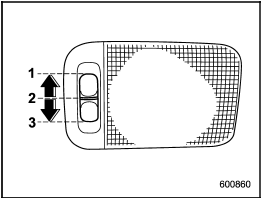
Cargo area light
1) DOOR
2) OFF
3) ON
The cargo area light switch has the following positions.
DOOR: The light illuminates when the rear gate is opened. The light remains illuminated for several seconds and turns off after the rear gate is closed.
OFF: The light remains off.
ON: The light remains on continuously.
See also:
AM selection
Press the “AM” button when the radio is on to select AM reception. ...
Manhart Unleashes the C63 S E Performance with 725hp
In a bold move, Manhart has taken the already potent hybrid C63 and pushed it to new heights of performance. While power and torque were never lacking in the hybrid C63, that didn't deter Manhart fr ...
Front fog light (if equipped)
NOTE
It may be difficult to replace the bulbs. We recommend that you have the bulbs
replaced by your SUBARU dealer if necessary.
1. Pull off the fender lining. Refer to “Pulling off the fender lin ...