


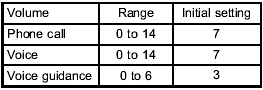
Adjustable level of each volume
Subaru Forester / Subaru Forester Owners Manual / Audio / Hands-free system (if equipped) / Using the Hands-free system / Adjustable level of each volume
See also:
Locking the passengers’ windows
1) Lock
2) Unlock
To lock:
Press the lock switch. When the lock switch is in the lock position, the passengers’
windows cannot be opened or closed.
To unlock:
Press the lock switch again. ...
Using the Hands-free system
NOTE
You can select the menus by operating the “TUNE/TRACK/CH” dial or using the voice command system. Refer to “Menu list of the Hands-free system” or “Voice command system”. ...
To decrease the speed (by the “RES/SET” switch)
Press the “RES/SET” switch to the “SET” side and hold it until the vehicle reaches
the desired speed. Then, release the switch. The vehicle speed at that moment will
be memorized and treated as ...