


Power switch and volume control
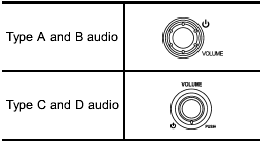
The dial is used for both power (ON/OFF) and volume control. The radio is turned ON and OFF by pushing the dial, and the volume is controlled by turning the dial.
See also:
System monitors
SRS airbag system warning light
A diagnostic system continually monitors the readiness of the seatbelt pretensioner
while the vehicle is being driven. The seatbelt pretensioners share the control ...
Hill start assist system (MT models – if equipped)
The Hill start assist system is a device only for helping the driver to START the vehicle on an uphill grade. To prevent accidents when the vehicle is parked on a slope, be sure to firmly set the ...
Immobilizer
FCC WARNING
Changes or modifications not expressly
approved by the party responsible
for compliance could void
the user’s authority to operate the
equipment.
The immobilizer system is de ...