


Type C audio set (if equipped)
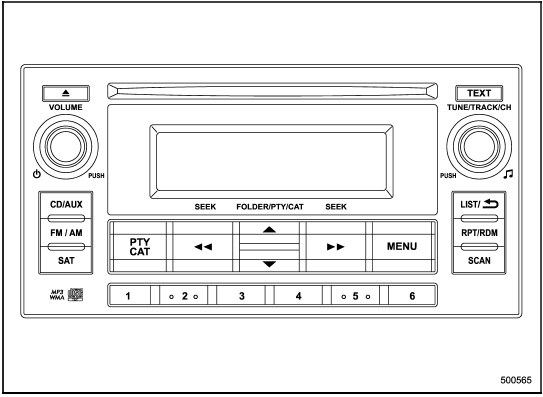
Type C audio set (if equipped)
The audio set will operate only when the ignition switch is in the “Acc” or “ON” position.
- Power and audio controls: refer to page
- Radio operation: refer to page
- Satellite radio operation (if equipped): refer to page
- CD (compact disc) player operation: refer to page
- Auxiliary input jack: refer to page
- USB storage device/iPod® operation: refer to page
- Hands-free system: refer to page
See also:
Exciting drive
The 2.5-liter, four-cylinder turbocharged engine may also play a role in
injecting "go-fast" into your blood. The engine creates 265 horsepower and 244
pound-feet of torque, which for a ...
Adjusting the front seat shoulder belt anchor height
The shoulder belt anchor height should be adjusted to the position best suited
for the driver/front passenger. Always adjust the anchor height so that the shoulder
belt passes over the middle of ...
Air inlet selection button
Air inlet selection button
ON position (recirculation): Interior air is
recirculated inside the vehicle. Push the
air inlet selection button to the ON position
for fast cooling with the air c ...