


Control panel
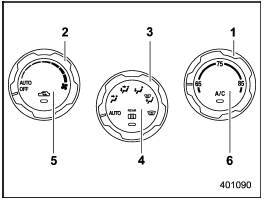
Control panel
1) Temperature control dial
2) Fan speed control dial
3) Airflow control dial
4) Control switch of the defogger and deicer system (Refer to “Defogger and
deicer”.)
5) Air inlet selection button
6) Air conditioner button
See also:
How to insert a CD (type A)
While the ignition switch is in the “Acc” or “ON” position, hold a disc with
a finger in the center hole while gripping the edge of the disc, then insert it
in to the slot (with the label side up) ...
High beam indicator light
This light shows that the headlights are in
the high beam mode.
This indicator light also illuminates when
the headlight flasher is operated. ...
Rear view camera (if equipped)
Legacy
Outback
A rear view camera is attached to the trunk lid (Legacy) or rear gate (Outback).
When the ignition switch is “ON” and the shift lever (MT models) or select lever
(AT or CVT mo ...