


Temperature control dial
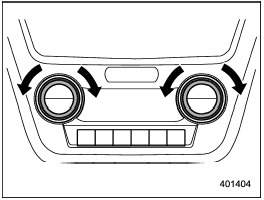
Temperature control dial
To increase the temperature setting, turn the temperature control dial clockwise. To decrease the temperature setting, turn the dial counterclockwise.
Each temperature setting is shown on the display.
See also:
Glove box
Glove box
1) Lock
2) Unlock
To open the glove box, pull the handle. To close it, push the lid firmly upward.
To lock the glove box, insert the key and turn it clockwise. To unlock the glove box, i ...
Use of engine braking
Remember to make use of engine braking in addition to foot braking. When descending a grade, if only the foot brake is used, the brakes may start working improperly because of brake fluid overheating, ...
Headlight indicator light
This indicator light illuminates under the following conditions.
● when the light switch is turned to the “”
or “” position
● when the light switch is in the “AUTO” position and the ...