


Heating
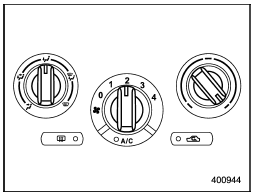
Heating
To direct warm air toward the floor:
1. Set the air inlet selection button to the
OFF position.
2. Set the airflow control dial to the “ ”
position.
”
position.
3. Set the temperature control dial to the most comfortable level.
4. Set the fan speed control dial to the desired speed.
See also:
Remote engine start system (dealer option)
WARNING
● Do not remote start a vehicle in an enclosed environment (e.g. closed garage).
Prolonged operation of a motor vehicle in an enclosed environment can cause a harmful
build-up of Ca ...
START
The engine is started in this position. The
starter cranks the engine to start it. When
the key is released (after the engine has
started), the key automatically returns to
the “ON” position.
...
SUBARU advanced frontal airbag system
Your vehicle is equipped with a SUBARU advanced frontal airbag system that complies
with the new advanced frontal airbag requirements in the amended Federal Motor Vehicle
Safety Standard (FMVSS) N ...