


Control panel
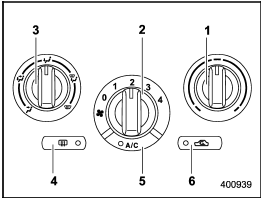
Control panel
1) Temperature control dial
2) Fan speed control dial
3) Airflow control dial
4) Control switch of the defogger and deicer system (Refer to “Defogger and
deicer”.)
5) Air conditioner button
6) Air inlet selection button
See also:
Wiper and washer
WARNING
In freezing weather, do not use the windshield washer until the windshield is
sufficiently warmed by the defroster.
Otherwise the washer fluid can freeze on the windshield, blocking your v ...
Ventilation
Ventilation
To force outside air through the instrument
panel outlets:
1. Set the air inlet selection button to the
OFF position.
2. Set the airflow control dial to the “”
position.
3. ...
Sensor for the auto on/off headlights
The sensor is on the instrument panel as shown in the illustration.
CAUTION
If any object is placed on or near the sensor, the sensor may not detect the
level of the ambient light correctly and ...