


Wiper intermittent time control
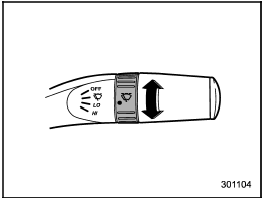
Wiper intermittent time control
When the wiper switch is in the “ ”
position, turn the dial to adjust the operating
interval of the wiper.
”
position, turn the dial to adjust the operating
interval of the wiper.
The operating interval can be adjusted continuously from the shortest interval to the longest.
The operating interval can be adjusted in nine steps.
See also:
AT models
The key can be turned from “Acc” to “LOCK” only when the select lever is in the “P” position. ...
Towing and tie-down hooks/holes
The towing hooks should be used only in an emergency (e.g., to free a stuck vehicle
from mud, sand or snow).
CAUTION
● Use only the specified towing hooks and tie-down hooks/holes. Never use ...
Exterior & Styling
Let's not mince words here: When it comes to styling, Subaru went off the
deep end a few years ago and brought us such gems as the B9 Tribeca — later
blandified — and a couple models whose grilles ...