


Information display
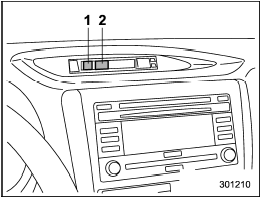
Information display
1) Outside temperature indicator
2) Fuel consumption indicator
With the ignition switch in the “ON” position, the outside temperature and fuel consumption are indicated on the display.
For type A combination meter:
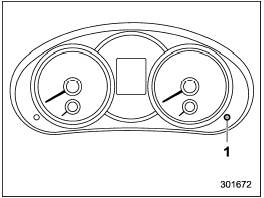
1) Information display switching knob
With the ignition switch in the “ON” position, each successive press of the information display switching knob toggles the display in the following sequence.

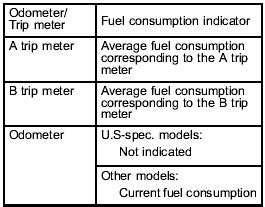
For type B combination meter:
The fuel consumption indicator is linked with the odometer/trip meter display on the combination meter, according to the following chart.
See also:
Checking the fluid level
The automatic transmission fluid expands largely as its temperature rises; the
fluid level differs according to fluid temperature. Therefore, there are two different
scales for checking the level ...
Power seat (if equipped)
WARNING
To prevent the passenger from sliding under the seatbelt in the event of a collision,
always put the seatback in the upright position while the vehicle is in motion.
Also, do not place ...
Driving tips
Do not drive with your foot resting on the clutch pedal and do not use the clutch
to hold your vehicle at a standstill on an upgrade. Either of those actions may
cause clutch damage.
Do not drive ...