


Locking the passengers’ windows
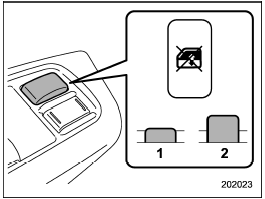
Locking the passengers’ windows
1) Lock
2) Unlock
Push the lock switch. When the lock switch is in the “LOCK” position, the passengers’ windows cannot be opened or closed.
Push the switch again to cancel the passengers’ window locking.
See also:
Replacing the battery
CAUTION
● Do not let dust, oil or water get on or in the transmitter when replacing the
battery.
● Be careful not to damage the printed circuit board in the transmitter when replacing ...
When “CHECK DEVICE” is displayed
This message is displayed under the
following conditions.
- When there is a short in the USB bus
- When a non-corresponding device (for
example a USB mouse) is connected
- When a non-correspo ...
Cleaning the interior
Use a soft, damp cloth to clean the climate control panel, audio equipment, instrument
panel, center console, combination meter panel, and switches. (Do not use organic
solvents.) ...