


Rear center seating position

The head restraint is not intended to be used at the lowest position.
Before sitting on the seat, raise the head restraint to an appropriate position depending on your sitting height.
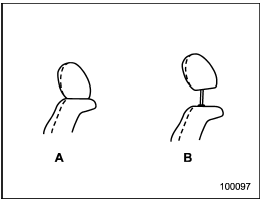
A) When not used (retracted position)
B) When used (click position)
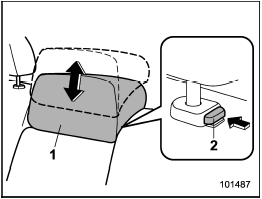
1) Head restraint
2) Release button
To raise:
Pull the head restraint up.
To lower:
Push the head restraint down while
pressing the release button on the top of
the seatback.
To remove:
While pressing the release button, pull out
the head restraint.
To install:
Install the head restraint into the holes that
are located on the top of the seatback until
the head restraint locks.
When the rear-center seating position is occupied, raise the head restraint to an appropriate position depending on your sitting height. When the rear center seating position is not occupied, lower the head restraint to improve rearward visibility.
See also:
Roof antenna
- Be sure to lower the antenna rod
before entering garages, parking
towers and other locations with
low ceilings.
- Remove the antenna rod before
washing your car at a car wash. If
the ...
Top tether anchorages
Your vehicle is equipped with three top tether anchorages so that a child restraint
system having a top tether can be installed in the rear seat. When installing a
child restraint system using top ...
Exterior
1) Engine hood lock release (page 11-7)
2) Headlight switch (page 3-28)
3) Bulb replacement (page 11-48)
4) Wiper switch (page 3-32)
5) Moonroof (page 2-28)
6) Roof rail (page 8-14)
7) Door lo ...