


Forward and backward adjustment
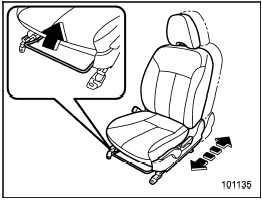
Forward and backward adjustment
Pull the lever upward and slide the seat to the desired position. Then release the lever and move the seat back and forth to make sure that it is securely locked into place.
See also:
Vehicle identification
Vehicle identification
1) Vehicle identification number
2) Emission control label
3) Tire inflation pressure label
4) Certification label
5) Vehicle identification number plate
6) Model n ...
Shift lock release
If the select lever cannot be operated, turn the ignition switch back to the “ON” position then move the select lever to the “P” position with the brake pedal depressed.
If the select lever does not ...
Cruise control set indicator light
The cruise control set indicator light illuminates when the ignition switch is
turned to the “ON” position and turns off after approximately 3 seconds.
The light illuminates when vehicle speed ha ...