


Function settings
A SUBARU dealer can change the settings of the functions shown in the following table to meet your personal requirements. Contact the nearest SUBARU dealer for details. If your vehicle is equipped with the genuine SUBARU navigation system, the settings for some of these functions can be changed using the navigation monitor. For details, please refer to the Owner’s Manual supplement for the navigation system.
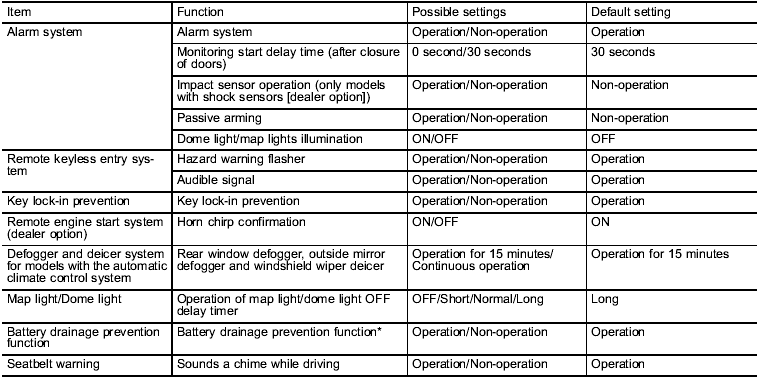
*: The setting can only be changed at a SUBARU dealer.
See also:
Loading your vehicle
WARNING
Never allow passengers to ride on a folded rear seatback, in the trunk or in
the cargo area. Doing so may result in serious injury.
WARNING
● Never stack luggage or other cargo hi ...
Wear indicators
1) New tread
2) Worn tread
3) Tread wear indicator
Each tire incorporates a tread wear indicator, which becomes visible when the
depth of the tread grooves decreases to 0.063 in (1.6 mm). A tir ...
Construction
The generic name of each cord
material used in the plies (both
sidewall and tread area) of this tire.
For example, “PLIES: TREAD 2
STEEL + 2 POLYESTER SIDEWALL
2 POLYESTER” ...