


Instrument panel
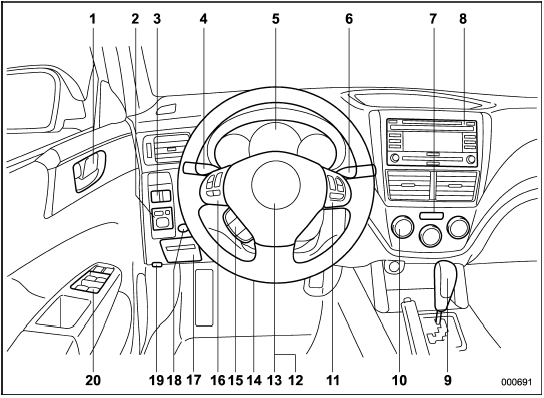
1) Door locks
2) Outside mirror switch
3) Illumination brightness control
4) Light control lever
5) Combination meter
6) Wiper control lever
7) Hazard warning flasher switch
8) Audio
9) Shift lever (MT)/Select lever (AT)
10) Climate control
11) Cruise control
12) Horn
13) SRS airbag
14) Tilt/telescopic steering
15) Hands-free switches
16) Audio control buttons
17) Fuse box
18) Vehicle Dynamics Control OFF switch
19) Hood lock release knob
20) Power windows
See also:
GVWR and GAWR (Gross Vehicle Weight Rating and Gross Axle Weight Rating)
Certification label
The certification label attached to the driver’s side door shows GVWR (Gross
Vehicle Weight Rating) and GAWR (Gross Axle Weight Rating).
The GVW (Gross Vehicle Weight) must n ...
Maximum permissible inflation pressure
The maximum cold inflation pressure
to which this tire may be
inflated. For example, “300 kPa
(44 PSI) MAX. PRESS” ...
Parking brake warning
The light illuminates with the parking
brake applied while the ignition switch is
in the “ON” position. It turns off when the
parking brake is fully released. ...