


Fluids
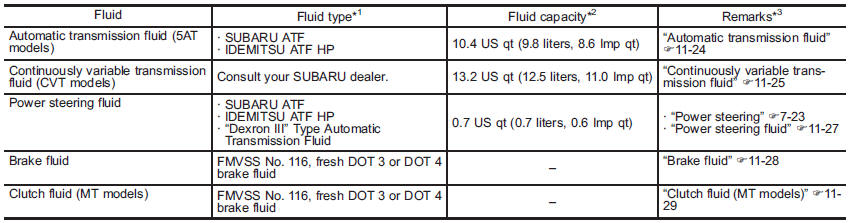
*1: Use one of the indicated types of fluid.
*2: The indicated fluid quantity is only a guideline. The necessary quantity for replacement may differ slightly depending on the temperature and other factors.
*3: For more details about maintenance and service, refer to the indicated section.
See also:
Stowage of the cargo area cover
The cargo area cover can be stowed in under the cargo floor.
1. To open the lid, pull the handle up.
2. To keep the lid open, hang the hook (provided on the back of the lid) on the
rear edge o ...
Determining compatibility of tire and vehicle load capacities
The sum of four tires’ maximum
load ratings must exceed the maximum
loaded vehicle weight
(“GVWR”). In addition, sum of the
maximum load ratings of two front
tires and of two rear tires must ...
Precautions to observe when handling a compact disc
Use only compact discs (CDs, CD-Rs and CD-RWs) that have the mark shown in the
following illustration. Also, some compact discs cannot be played.
● You cannot use a DualDisc in the CD pla ...