


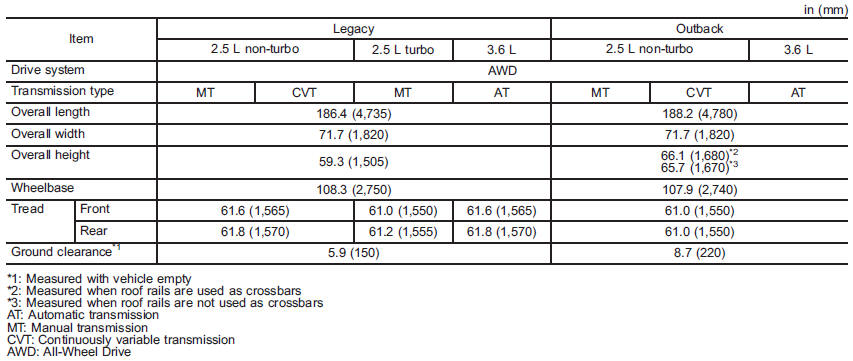
Dimensions
See also:
Precautions to observe when handling a compact disc
Use only compact discs (CDs, CD-Rs and CD-RWs) that have the mark shown in the
following illustration. Also, some compact discs cannot be played.
● You cannot use a DualDisc in the CD pla ...
SRS airbag system servicing
• When discarding an airbag module or scrapping the entire vehicle damaged by a collision, consult your SUBARU dealer.
• The SRS airbag has no userserviceable parts. Do not use electrical test eq ...
Driving with pets
Unrestrained pets can interfere with your driving and distract your attention
from driving. In a collision or sudden stop, unrestrained pets or cages can be thrown
around inside the vehicle and hu ...