


Loading your vehicle
WARNING
Never allow passengers to ride on a folded rear seatback, in the trunk or in the cargo area. Doing so may result in serious injury.
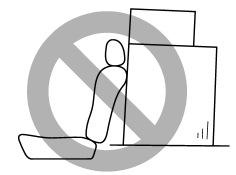
WARNING
● Never stack luggage or other cargo higher than the top of the seatback because it could tumble forward and injure passengers in the event of a sudden stop or accident. Keep luggage or cargo low, as close to the floor as possible.
● When you carry something inside the vehicle, secure it whenever you can to prevent it from being thrown around inside the vehicle during sudden stops, sharp turns or in an accident.
● Do not pile heavy loads on the roof. These loads raise the vehicle’s center of gravity and make it more prone to tip over.
● Secure long items properly to prevent them from shooting forward and causing serious injury during a sudden stop.
● Never exceed the maximum load limit. If you do, some parts on your vehicle can break, or it can change the way your vehicle handles. This could result in loss of control and cause personal injury. Also, overloading can shorten the life of your vehicle.
● Do not place anything on the rear shelf behind the rear seatback (Legacy) or the extended luggage cover (Outback). Such items could tumble forward in the event of a sudden stop or a collision. This could cause serious injury.
CAUTION
Do not carry spray cans, containers with flammable or corrosive liquids or any other dangerous items inside the vehicle.
NOTE
For better fuel economy, do not carry unneeded cargo.
See also:
Operating the driver’s window
1) Automatically open/close
2) Open/close
To open:
Press the switch down lightly and hold it. The window will open as long as the
switch is held.
This switch also has a one-touch auto down fun ...
Non-turbo models
The non-turbo engine is designed to operate using unleaded gasoline with an octane
rating of 87 AKI or higher. ...
SRS airbag system servicing
• When discarding an airbag module or scrapping the entire vehicle damaged by a collision, consult your SUBARU dealer.
• The SRS airbag has no userserviceable parts. Do not use electrical test eq ...