


To remove the cover housing
Subaru Legacy / Subaru Legacy Owners Manual / Interior equipment / Cargo area cover (if equipped) / To remove the cover housing
1. Rewind the cover.
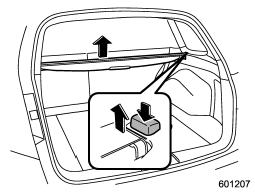
2. Hold down the button on the righthand rear quarter panel and lift up the right-hand cover housing.
3. Remove the cover housing.
See also:
Airflow control dial
Each dial position activates the following
air outlets.
(Ventilation): Instrument panel
outlets
(Bi-level): Instrument panel
outlets and
foot outlets
(Heat): Foot outlets, both sid ...
Washing
• When washing the vehicle, the brakes may get wet. As a result, the brake stopping distance will be longer. To dry the brakes, drive the vehicle at a safe speed while lightly depressing the brake ...
Acc
In this position the electrical accessories (radio, accessory power outlet, etc.)
can be used. ...