


Door interlock switch
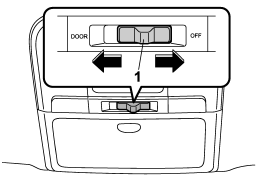
1) Door interlock switch
Although the map light switches are in the OFF position (manually off), the map lights can be set to illuminate automatically in conjunction with a door opening, etc. by use of the door interlock switch. The door interlock switch has the following two positions.
OFF: The map lights do not illuminate automatically in conjunction with a door opening. But, the lights can be turned on manually by pressing the map light switches.
DOOR: The map lights illuminate automatically in the following cases.
● Any of the doors (other than the rear gate or trunk lid) is opened. The map lights do not illuminate when only the rear gate is opened.
● The doors are unlocked using the remote keyless entry transmitter.
● The ignition switch is turned from the “Acc” position to the “LOCK” position. The automatically illuminated map lights remain on for several seconds and then gradually turn off after all doors are closed. While the lights are on, if any of the following operations are performed, the map lights turn off immediately.
● The ignition switch is turned from the “LOCK” position to the “Acc” or “ON” position.
● All doors are locked using the remote keyless entry transmitter.
The setting of the period for which the lights remain on (OFF delay timer) can be changed by a SUBARU dealer. Contact your SUBARU dealer for details.
See also:
Side mirrors
After hitching a trailer to your vehicle, check that the standard side mirrors
provide a good rearward field of view without significant blind spots. If significant
blind spots occur with the ve ...
Airflow control dial
Airflow control dial
Each dial position activates the following
air outlets.
AUTO: The airflow control is adjusted
automatically in accordance with the air
temperature inside and outside the ...
Low fuel warning light
The low fuel warning light illuminates when the fuel tank is nearly empty. It
only operates when the ignition switch is in the “ON” position. When this light
illuminates, fill the fuel tank immedi ...