


Volume control
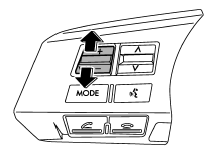
You can adjust the phone call volume, the voice volume and the voice guidance volume. Refer to “Volume control switch” F5-32.
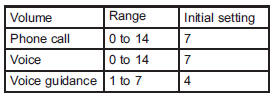
Adjustable level of each volume
See also:
Wiper intermittent time control
When the wiper switch is in the “INT” position, turn the dial to adjust the operating
interval of the wiper. The operating interval can be adjusted in five steps from
the shortest interval to th ...
Interior
Passenger compartment area
1) Lower anchorages for child restraint system
2) Seatbelt
3) Parking brake lever
4) Front seat
5) Rear seat
1) Center console
2) Cup holder
3) Front p ...
Foreword
Congratulations on choosing a SUBARU vehicle. This Owner’s Manual has all the information necessary to keep your SUBARU in excellent condition and to properly maintain the emission control system for ...