


Folder selection
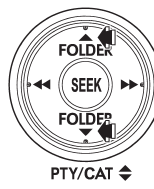
Press the “ ” side of the “FOLDER”
button briefly to select the next folder.
Press the “ ” side of the button briefly
to go back to the previous folder.
NOTE
● Selecting folders in this way is possible only within a single disc.
● Only MP3/WMA/AAC folders are recognized when an attempt to select the next or
previous folder is made. If no appropriate folder exists on the disc, pressing the
“ ” or “
 ”
”
side of the “FOLDER” button starts playback beginning with the first track/file
(track).
See also:
Tire rotation direction mark
Example of tire rotation direction mark
1) Front
If the tire has the rotation direction
specification, the tire rotation direction
mark is placed on its sidewall.
When you install a tire that ...
Intelligent (I) mode
For smooth, efficient performance driving
The Intelligent (I) mode provides wellbalanced performance with greater fuel efficiency and smooth driveability without stress. Power delivery is moderate du ...
ABS warning light
The ABS warning light illuminates when the ignition switch is turned to the “ON”
position and turns off after approximately 2 seconds.
This is an indication that the ABS system is working properl ...