


Skip channel selection
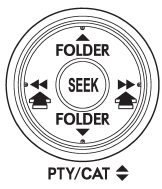
When in the SAT mode, press the “SEEK” button “ ”
”
or “ ” continuously to change to the
channel selection mode. Pressing the “SEEK” button “ ”
”
changes the channel up by 10 steps each time. Pressing “ ”
”
changes the channel down by 10 steps each time.
See also:
Channel selection by operating the dial
Turn the “TUNE/TRACK/CH” dial clockwise to select the next channel and turn the
“TUNE/TRACK/CH” dial counterclockwise to select the previous channel. ...
Spark plugs
It may be difficult to replace the spark plugs. It is recommended that you have
the spark plugs replaced by your SUBARU dealer.
The spark plugs should be replaced according to the maintenance sched ...
Temperature control dial
This dial regulates the temperature of
airflow from the air outlets over a range
from the blue side (cool) to red side
(warm). ...