


Adjustable level of each mode
Subaru Legacy / Subaru Legacy Owners Manual / Audio / Power and sound controls / Adjustable level of each mode
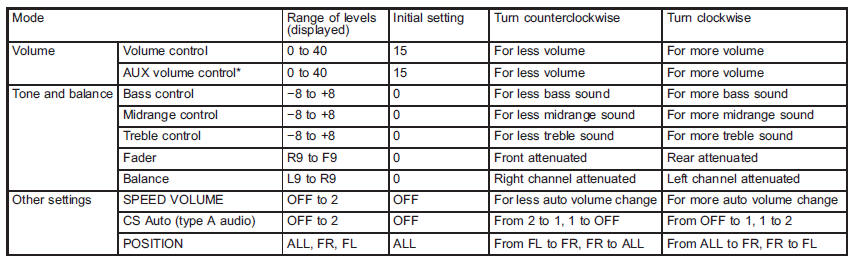
*Only when an AUX audio product is connected.
See also:
Screensaver (type D audio)
If the following operations are not performed
for more than 30 seconds while
the audio is ON, the screensaver will be
displayed.
- Operate any button or dial
- Shift the shift lever/select le ...
Fuel
CAUTION
Use of a fuel which is low in quality or use of an inappropriate fuel additive
may cause engine damage. ...
SRS airbag system warning light
When the ignition switch is turned to the “ON” position, the SRS airbag system
warning light will illuminate for approximately 6 seconds and turn off. This shows
the SRS frontal airbag and SRS sid ...