


Printed antenna
CAUTION
Do not use sharp instruments or window cleaner containing abrasives to clean the inner surface of the window on which the antenna is printed. Doing so may damage the antenna printed on the window.
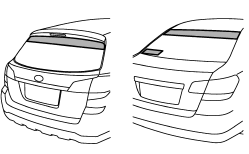
The antenna is printed on the inner surface of the rear window glass.
NOTE
Antenna performance will deteriorate significantly if you apply tinting film or any other material over the antenna portion of the rear window glass.
See also:
Wheels and tyres
The standard wheel and tyre combination on the Subaru Outback is a 17-inch
alloy wheel with 225/60 R17 tyre.
STRUCTURE AND SAFETY
As well as 'new-look' styling, larger dimensions and new suspens ...
Braking when a tire is punctured
Do not depress the brake pedal suddenly when a tire is punctured. This could
cause a loss of control of the vehicle. Keep driving straight ahead while gradually
reducing speed. Then slowly pull of ...
2011 Subaru Impreza WRX STi review By Scott Burgess
We all play favorites. Is that why we have elections? Or is it just for the
commercials?
In the automotive world, car buyers play favorites as well ∔ weighing the
pros and cons of differ ...