


Center ventilators
Subaru Legacy / Subaru Legacy Owners Manual / Climate control / Ventilator / Ventilators / Center ventilators
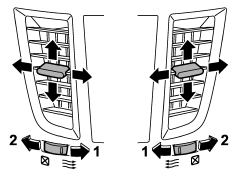
1) Open
2) Close
Move the tab to adjust the flow direction. To open the ventilator, turn the center
grille open/close wheel to the “ ” position.
To close it, turn the wheel to the “ ”
”
position.
See also:
Fuse panel located in the engine compartment
A) Main fuse
...
Seek tuning (SEEK)
If you press the “” or “”
side of the “SEEK” button briefly, the radio will automatically search for a receivable
station and stop at the first one it finds. This function may not be available, ...
Tire pressures
WARNING
Driving at high speeds with excessively low tire pressures can cause the tires
to deform severely and to rapidly become hot. A sharp increase in temperature could
cause tread separation, ...