


Compass zone adjustment
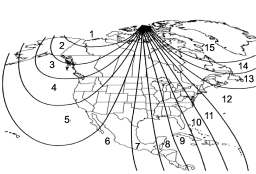
Compass calibration zones
1. Refer to the “Compass calibration zones” map shown above to verify that the compass zone setting is correct for your geographical location.
2. Press and hold the switch for 6 seconds until the zone selection comes up (a number will be displayed in the mirror compass window).
3. Press the switch repeatedly until the correct zone setting for your location is displayed.
4. Releasing the button for 10 seconds will exit the zone setting mode.
See also:
Temperature control dial
This dial regulates the temperature of airflow from the air outlets over a range
from the blue side (cool) to red side (warm). ...
Installation of accessories
Always consult your SUBARU dealer before installing fog lights or any other electrical equipment in your vehicle. Such accessories may cause the electronic system to malfunction if they are incorrectl ...
Winter driving
Winter driving ...