


SRS airbag system monitors
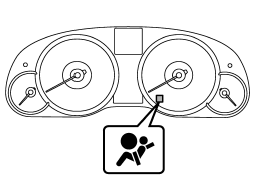
A diagnostic system continually monitors the readiness of the SRS airbag system (including front seatbelt pretensioners) while the vehicle is being driven. The SRS airbag system warning light will show normal system operation by illuminating for approximately 6 seconds when the ignition switch is turned to the “ON” position.
The following components are monitored by the indicator.
● Front sub sensor (right-hand side)
● Front sub sensor (left-hand side)
● Airbag control module (including impact sensors [all models] and rollover sensors
[Outback])
● Frontal airbag module (driver’s side)
● Frontal airbag module (front passenger’s side)
● Center pillar impact sensor (right-hand side)
● Center pillar impact sensor (left-hand side)
● Front door impact sensor (right-hand side)
● Front door impact sensor (left-hand side)
● Side airbag module (driver’s side)
● Side airbag module (front passenger’s side)
● Rear wheel house impact sensor (righthand side)
● Rear wheel house impact sensor (lefthand side)
● Curtain airbag module (right-hand side)
● Curtain airbag module (left-hand side)
● Seatbelt pretensioner (driver’s side)
● Seatbelt pretensioner (front passenger’s side)
● Seatbelt buckle switch (front passenger’s side)
● Front passenger’s occupant detection system weight sensor
● Front passenger’s occupant detection control module
● Front passenger’s frontal airbag ON and OFF indicator
● All related wiring
WARNING
If the warning light exhibits any of the following conditions, there may be a malfunction in the seatbelt pretensioners and/or SRS airbag system. Immediately take your vehicle to your nearest SUBARU dealer to have the system checked. Unless checked and properly repaired, the seatbelt pretensioners and/or SRS airbags will operate improperly (e.g. SRS airbags may inflate in a very minor collision or not inflate in a severe collision), which may increase the risk of injury.
● Flashing or flickering of the warning light
● No illumination of the warning light when the ignition switch is first turned to the “ON” position
● Continuous illumination of the warning light
● Illumination of the warning light while driving
See also:
Airflow mode selection button
Airflow mode selection button
Select the desired airflow mode by pressing
the airflow mode selection button. The
selected airflow mode is indicated on the
display.
Each airflow mode activate ...
Menu list of the Hands-free system
Turn the “TUNE/TRACK/CH” dial to select a menu, and then press the dial to enter
the selected menu.
NOTE
For details about the operation, follow the voice guidance.
*: If a cell phone is not ...
Locking and unlocking from the inside
WARNING
Keep all doors locked when you drive, especially when small children are in your
vehicle.
Along with the proper use of seatbelts and child restraints, locking the doors
reduces the chanc ...