


Driver’s seat
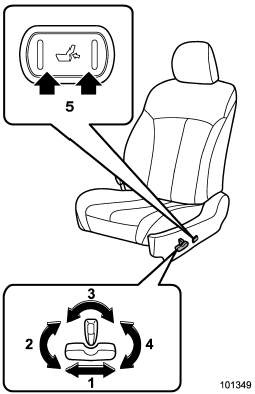
1) Seat position forward/backward control switch To adjust the seat forward or backward, move the control switch forward or backward. During forward/backward adjustment of the seat, you cannot adjust the seat cushion angle or seat cushion height.
2) Seat cushion angle control switch To adjust the seat cushion angle, pull up or push down the front end of the control switch.
3) Seatback angle (reclining) control switch To adjust the angle of the seatback, move the control switch.
4) Seat height control switch To adjust the seat height, pull up or push down the rear end of the control switch.
5) Lumbar support control switch To increase lower back support, push the front side of the switch. To decrease lower back support, push the rear side of the switch.
See also:
AT OIL TEMP warning light (AT and CVT models)
The AT oil temperature warning light “AT OIL TEMP” illuminates when the ignition
switch is turned to the “ON” position and turns off after approximately 2 seconds.
If this light illuminates when t ...
Registering from call back
1. Select the “CALL BACK” menu.
2. Select the phone number by operating the “TUNE/TRACK/CH” dial.
3. Select the “STORE” menu.
4. Select the “CONFIRM” menu.
5. Select the “RECORD NAME” menu by oper ...
XMTM satellite radio reception tips for antenna on the windshield (for
U.S.A. only — if equipped)
For some models, the satellite radio antenna is fixed to the upper right hand corner of the windshield.
The XMTM satellite radio receiver that is fitted to your vehicle receives the necessary signa ...