


Forward and backward adjustment
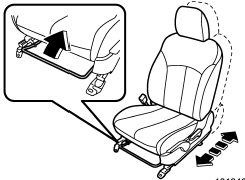
Pull the lever upward and slide the seat to the desired position. Then release the lever and try to move the seat back and forth to make sure that it is securely locked into place.
See also:
Waxing and polishing
Always wash and dry the vehicle before waxing and polishing.
Use a good quality polish and wax and apply them according to the manufacturer’s instructions. Wax or polish when the painted surface is c ...
Glove box
Glove box
1) Lock
2) Unlock
To open the glove box, pull the handle. To
close it, push the lid firmly upward.
To lock the glove box, insert the key and
turn it clockwise. To unlock the glo ...
Disarming the system
Briefly press the “” button (for
less than 2 seconds) on the remote transmitter. The driver’s door will unlock, an
electronic chirp will sound twice, the turn signal lights will flash twice and th ...