


Function settings
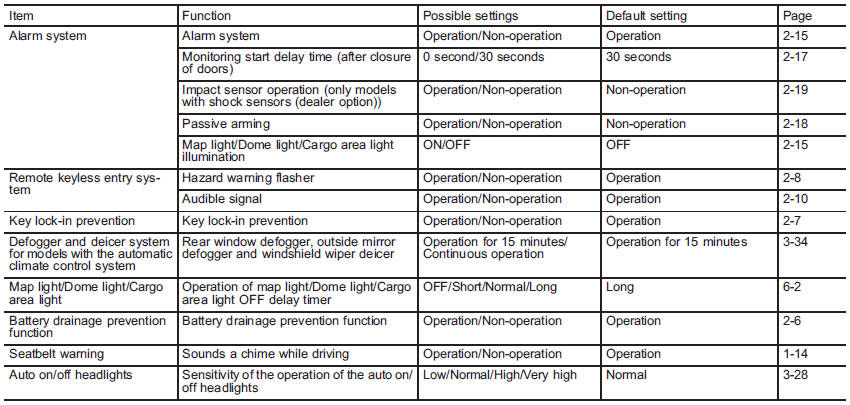
A SUBARU dealer can change the settings of the functions shown in the following table to meet your personal requirements. Contact the nearest SUBARU dealer for details.
See also:
Low fuel warning light
The low fuel warning light illuminates when the tank is nearly empty approximately
2.6 US gal (10.0 liters, or 2.2 Imp gal). It only operates when the ignition switch
is in the “ON” position.
N ...
Defroster button
To defrost or dehumidify the windshield
and front door windows, press the defroster button “”.
When the “” button is pressed, the
air conditioner compressor automatically operates to quickly ...
Cooling fan, hose and connections
Your vehicle employs an electric cooling fan which is thermostatically controlled
to operate when the engine coolant reaches a specific temperature.
If the radiator cooling fan does not operate eve ...