


Abbreviation list
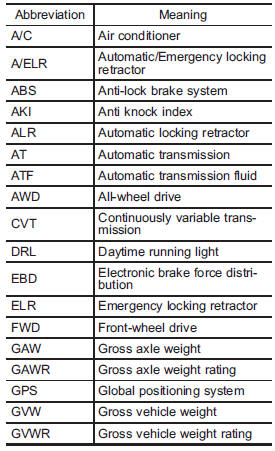
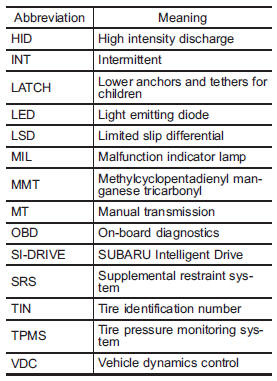
You will find several abbreviations in this manual. The meanings of the abbreviations are shown in the following list.
See also:
Recommended grade and viscosity
Use only engine oil with the recommended grade and viscosity.
Refer to “Engine oil”.
NOTE
Engine oil viscosity (thickness) affects fuel economy. Oils of lower viscosity provide better fuel econ ...
Driver’s SRS frontal airbag
The driver’s SRS frontal airbag uses a
dual stage inflator. The inflator operates in
different ways depending on the severity
of impact.
Have the system inspected by your
SUBARU dealer immedi ...
Climate control panel, audio panel, instrument panel, console panel, and
switches
Use a soft, damp cloth to clean the climate
control panel, audio equipment, instrument
panel, center console, combination
meter panel, and switches.
NOTE
Do not use organic solvents such as
...