


Type B
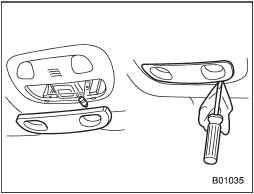
1. Remove the lens by prying the edge of the lens with a flat-head screwdriver.
2. Pull the bulb out of the socket.
3. Install a new bulb.
4. Reinstall the lens.
See also:
Traction mode
This mode restricts the functions of the Traction Control System and Vehicle Dynamics Control system and thus delays utilizing their functions as a reaction to vehicle behavior in comparison with the ...
Measuring and adjusting air pressure to achieve proper inflation
Check and, if necessary, adjust the pressure of each tire (including the spare)
at least once a month and before any long journey. Check the tire pressures when
the tires are cold. Use a pressure ...
Checking the brake pedal reserve distance
1) More than 2.56 in (65 mm)
Depress the pedal with a force of approximately 66 lbf (294 N, 30 kgf) and measure
the distance between the upper surface of the pedal pad and the floor.
When the me ...