


Low beam light bulbs
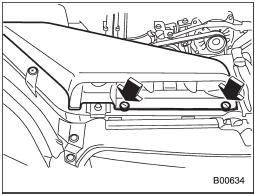
Right-hand side
1. Use a screwdriver to undo the clips on the air intake duct, then remove the air intake duct (right-hand side).
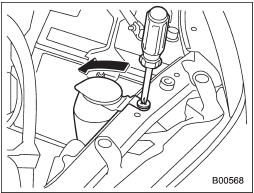
Left-hand side
2. Use a screwdriver to remove the secured clip of the washer tank. To make it easy to access the bulb, move the washer tank to the horizontal direction (left-hand side).
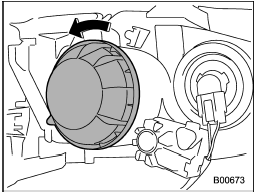
3. Remove the bulb cover, by turning it counterclockwise.
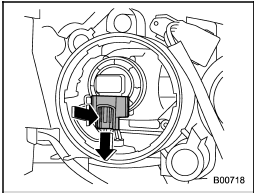
4. Disconnect the electrical connector from the bulb.
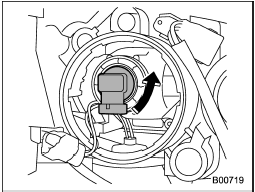
5. Remove the bulb from the headlight assembly by turning it counterclockwise.
6. Replace the bulb with a new one. At this time, do not touch the bulb surface.
7. To install the bulb to the headlight assembly, turn it clockwise until it clicks.
8. Reconnect the electrical connector.
9. Install the bulb cover.
10. Install the air intake duct with clips (right-hand side).
11. Set the washer tank to the original place and secure it by clip (left-hand side).
See also:
Seat fabric
Remove loose dirt, dust or debris with a
vacuum cleaner. If the dirt is caked on the
fabric or hard to remove with a vacuum
cleaner, use a soft brush then vacuum it.
Wipe the fabric surface wit ...
Adverse safety consequences of under-inflation
Driving at high speeds with excessively low tire pressures can cause the tires
to flex severely and to rapidly become hot. A sharp increase in temperature could
cause tread separation, and failure ...
Viewing range on the screen
Range of view
Range of view
Image from camera
The area from the rear end of the bumper
can be viewed. Areas at both ends of the
bumper and areas just under the bumper
cannot be vi ...