


To install the cover housing
Subaru Impreza / Subaru Impreza Owners Manual / Interior equipment / Cargo area cover (5-door – if equipped) / To install the cover housing
1. Shorten the bar.
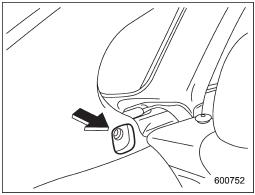
2. Insert the projections located on the both ends of the sleeve into the recesses of the retainers.
See also:
Station preset
Preset buttons ...
Moonroof (if equipped)
Never let anyone’s hands, arms, head or any objects protrude from the moonroof. A person could be seriously injured if the vehicle stops suddenly or turns sharply or if the vehicle is involved in ...
Vehicle finder function
Use this function to find your vehicle parked among many vehicles in a large
parking lot. Provided you are within 30 feet (10 meters) of the vehicle, pressing
the “” button three times in a 5-seco ...