


To remove the cover
1. Rewind the cover.
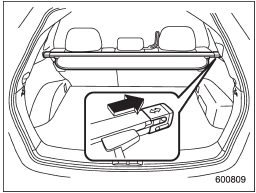
2. Push the bar to the right side and shorten the bar.
3. Take it off the retainer.
See also:
Towing
If towing is necessary, it is best done by
your SUBARU dealer or a commercial
towing service. Observe the following
procedures for safety.
Never tow AWD models (both AT and
MT) with t ...
Checking the oil level
AT models
1) Yellow handle
1. Park the vehicle on a level surface and stop the engine.
2. Pull out the level gauge, wipe it clean, and insert it again.
1) Upper level
2) Lower level
3. Pull ...
Brake booster
The brake booster uses engine manifold
vacuum to assist braking force. Do not
turn off the engine while driving because
that will turn off the brake booster, resulting
in poor braking power.
...