


Dome light
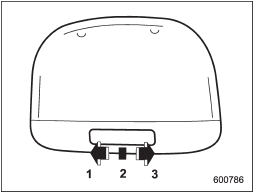
Dome light
1) ON
2) DOOR
3) OFF
The dome light switch has the following three positions.
ON: The light remains on continuously.
OFF: The light remains off.
DOOR: The dome light illuminates automatically in the following cases.
• Any of the doors or the rear gate (5- door) is opened.
• The doors or the rear gate (5-door) are unlocked using the remote keyless entry transmitter.
• The ignition switch is turned from the “Acc” position to the “LOCK” position.
The automatically illuminated dome light remains on for several seconds and then gradually turns off after all doors and the rear gate (5-door) are closed.
While the light is illuminated, if any of the following operations are performed, the dome light turns off immediately.
• The ignition switch is turned from the “LOCK” position to “Acc” or “ON” position.
• All doors and the rear gate (5-door) are locked using the remote keyless entry transmitter.
The setting of the period for which the light remains on (OFF delay timer) can be changed as follows.
• Models with genuine SUBARU navigation system:
The setting can be changed using the navigation monitor. For details, please refer to the Owner’s Manual supplement for the navigation system. Also, the setting can be changed by a SUBARU dealer.
Contact your SUBARU dealer for details.
• Models without genuine SUBARU navigation system:
The setting can be changed by a SUBARU dealer. Contact your SUBARU dealer for details.
See also:
Wear indicators
1) New tread
2) Worn tread
3) Tread wear indicator
Each tire incorporates a tread wear
indicator, which becomes visible when
the depth of the tread grooves decreases
to 0.063 in (1.6 mm). ...
Types of tires
You should be familiar with type of tires present on your vehicle. ...
Choosing a child restraint system
Choosing a child restraint system
Choose a child restraint system that is appropriate for the child’s age and size (weight and height) in order to provide the child with proper protection. The child ...