


Control panel
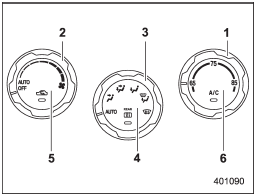
Control panel
1) Temperature control dial
2) Fan speed control dial
3) Airflow control dial
4) Control switch of the defogger and deicer system (Refer to “Defogger and
deicer”.)
5) Air inlet selection button
6) Air conditioner button
See also:
Channel scan
If you press the “SCAN” button while the radio is in the category search mode,
the radio turns to the category SCAN mode. In the category SCAN mode, the radio
scans only channels in the selected ...
Opening the trunk lid (Legacy)
The trunk lid opens when the “” button
is pressed continuously for at least 2 seconds. An electronic chirp will sound twice
and the turn signal lights will flash twice. ...
Behavior with key lock-in prevention function operational
With the driver’s door open, the doors are automatically kept unlocked even if
the front side of the power door locking switch is pressed. ...