


SI-DRIVE indicator light (STI)
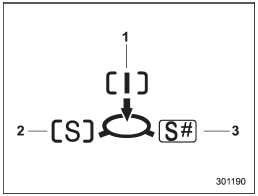
1) Intelligent (I) mode
2) Sport (S) mode
3) Sport Sharp (S#) mode
This light indicates the current SI-DRIVE mode.
For details of SI-DRIVE mode, refer to “SIDRIVE (STI)”.
See also:
Driving with pets
Unrestrained pets can interfere with your
driving and distract your attention from
driving. In a collision or sudden stop,
unrestrained pets or cages can be thrown
around inside the vehicle an ...
Engine oil
For the checking, adding and replacing procedure or other details, refer to
“Engine oil”.
NOTE
The procedure for changing the engine oil and oil filter should be performed by
a properly-trained ...
Using your Owner’s Manual
Before you operate your vehicle, carefully read this manual. To protect yourself
and extend the service life of your vehicle, follow the instructions in this manual.
Failure to observe these instr ...