


Locking the passengers’ windows
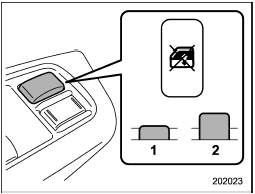
Locking the passengers’ windows
1) Lock
2) Unlock
Push the lock switch. When the lock switch is in the “LOCK” position, the passengers’ windows cannot be opened or closed.
Push the switch again to cancel the passengers’ window locking.
See also:
Drinking and driving
WARNING
Drinking and then driving is very dangerous. Alcohol in the bloodstream delays
your reaction and impairs your perception, judgment and attentiveness. If you drive
after drinking – even if ...
Clock
Clock
The clock shows the time while the
ignition switch is in the “Acc” or “ON”
position.
The time changes by 1 minute each time
the “+” button or “−” button is pressed.
Pressing t ...
Road surface freeze warning indication
1) U.S.-spec. models
2) Except U.S.-spec. models
When the outside temperature drops to 378F (38C) or lower, the temperature indication
flashes to show that the road surface may be frozen.
If th ...